
Published November 11, 2026
Easy Video Scripts In Two Minutes👉

Video scripts are EASY with the right tool. Read and watch how we create video scripts in less than 2 minutes for any product or service.
In LeadScripts' V2 you can simply:
1. Login
2. Click on Videos from the left menu
3. Click on Intro Scripts or Outro Scripts
Each is prefilled with your product or service details so you can instantly have a video script to use.
In the latest version of LeadScripts (V3), it's a bit different but even more intuitive.
1. Login to LeadScripts
2. Type "vid" in the search bar at the top. You'll get a bunch of results.
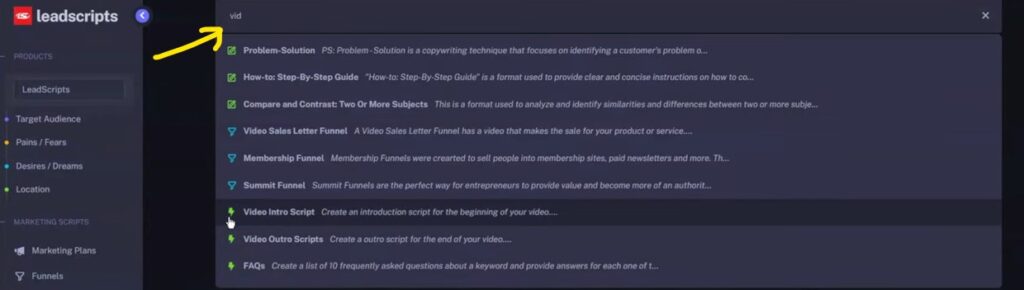
3. Click on "Video Intro Scripts" or "Video Outro Scripts" (Same example used in V2 above).
These instant scripts are ready automatically.
If you don't like the result feel free to click the "rewrite" button to have LeadScripts AI rewrite the script for you.
This is super helpful if your product details don't align perfectly with the video script.
🛑Not getting New Leads? Check This:

Ultimate Prompt Bundle (for New LEADS)
“If you can dream it, you can do it.”―Walt Disney
This blog post just covered 2 video scripts (Intro and Outro) in LeadScripts but there are several more ways to create interesting captivating scripts as well.
Login to LeadScripts and try the chat (OSCAR and ChatGPT) to generate some amazing video scripts as well.
New to LeadScripts?
After you subscribe to LeadScripts we'll send you a link to Results Academy packed with dozens of videos that will help you start capturing leads and sales.
Comments